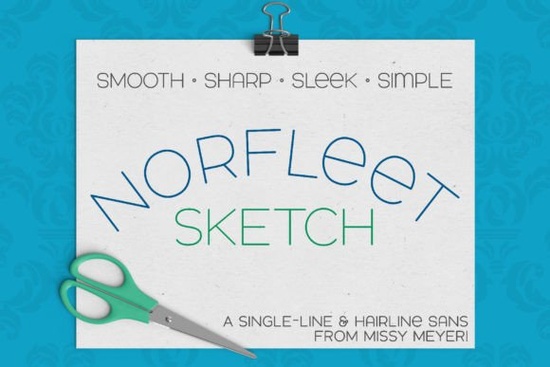
If you're looking for a clean, modern single-line font that works reliably across cutting machines and sketch pens, the Norfleet Sketch (single Line) Font is worth your attention. It’s designed from scratch as a true single-stroke typeface not just an outline shrunk down so it behaves predictably when used with tools like Cricut’s pen tool, Silhouette’s sketch function, Glowforge’s scoring mode, or even foil quill and infusible ink pens. Unlike many “single-line” fonts sold online, Norfleet Sketch comes in two intentional versions One and Two each built for different software workflows and skill levels.
Which version do I actually need?
This is the most common question and the answer depends on your software and comfort level with vector editing.
- Norfleet Sketch One is a true single-path font: one continuous stroke, start to finish. It’s ideal if you use Rhinoceros or are comfortable opening files in Illustrator or Inkscape to manually break or adjust paths. Some programs (like older versions of Silhouette Studio) may auto-close the path, but that’s easy to fix if you know how.
- Norfleet Sketch Two is a hairline outline font so thin the strokes appear as lines at normal size. It’s plug-and-play: install it, type, and go. Works out of the box in Cricut Design Space, CorelDRAW, Affinity Designer, Inkscape, and most other design or crafting apps without extra steps.
Neither version works in Word, Google Docs, or standard printers it’s not meant for body text or PDF documents. These are tool-driven fonts, made for drawing, engraving, scoring, or foiling not typing emails.
What does it look and feel like?
Norfleet Sketch has a relaxed, confident presence. It’s a sans-serif with smooth curves, generous spacing, and a wide stance that keeps letters legible even at smaller sizes. The uppercase set is fully double-height (no lowercase variants), but the lowercase includes thoughtful touches like a round-topped A and a soft, lowercase-style e giving subtle personality without sacrificing clarity. It pairs well with bolder display fonts like AB Varsity Outline or minimalist companions like Sogo Font. If you’re building a cohesive brand kit for print-on-demand apparel or stickers, it holds its own next to hand-drawn scripts or geometric sans-serifs like North Hiking.
Where can I use it and where won’t it work?
You’ll get best results using Norfleet Sketch with:
- Cricut Design Space (Pen tool, especially with Sketch Pens)
- Silhouette Studio (Sketch feature, with compatible pens)
- Glowforge (Scoring mode)
- Foil quill or Infusible Ink pens
- Laser engravers or CNC routers that accept vector paths
It’s not compatible with Brother CanvasWorkspace due to known path-handling limitations so if you rely on that platform, test carefully before purchasing. Also avoid using it for web fonts, social media graphics (unless exported as vectors), or anything requiring standard text rendering.
How do I choose between One and Two?
Start with Norfleet Sketch Two unless you specifically need a true open path for example, if you’re feeding files into a CNC workflow that requires unbroken vectors or want full control over stroke direction in a technical drawing. The included PDF guide walks through visual differences and shows exactly how each behaves in popular programs. You don’t need advanced skills to use Two but if you enjoy fine-tuning paths in Illustrator or Inkscape, One gives you that flexibility.
For crafters who want reliable, no-fuss sketching, Norfleet Sketch Two is the safer bet. For designers integrating into multi-step production pipelines especially those involving hardware beyond consumer-grade cutters One offers more precision. Either way, both versions are included in your download, so you can try both and keep what fits your setup.
Looking for similar single-line options? Check out Norfleet Sketch, North Hiking, or Sogo Font for complementary styles.
Before you install: Unzip the folder, install both .ttf files (One and Two), then restart your design app. Test with a short word like “YES” first check stroke continuity in your preview window, and verify pen movement matches your expectations. If lines appear filled or closed unexpectedly, switch to the other version or consult the included PDF guide for quick fixes in your specific program.
Explore Design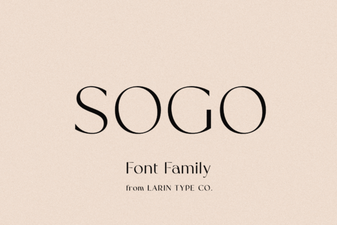 Sogo Font: Creative Uses and Design Ideas
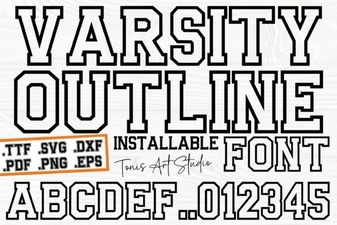 Modern Script Fonts for Creative Projects
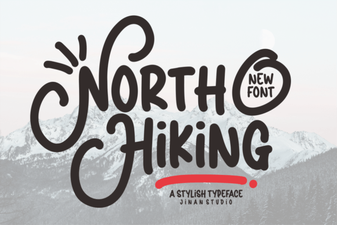 North Hiking Font: Creative Designs for Outdoor Projects
 Personal Monograms: Fonts for Crafting Your Signature Symbol
 Leonard Arvoire Font for Creative Projects
 Best Summer Beach Fonts for Your Design Projects